
Modern game development is not just about gameplay logic — UI animation, layout responsiveness, and smooth transformations play an equally important role. One small but powerful improvement recently introduced in Godot is the new pivot_offset_ratio property for Control nodes. While it may sound technical at first, this feature solves a long-standing problem in UI design and animation by making pivot positioning more flexible and responsive.
If you work with UI elements, menus, dialogs, or animated interfaces in Godot, this change can significantly simplify your workflow and reduce manual calculations.
Let’s understand what this feature is, what problem it solves, why it matters, and how to use it effectively.
What Is a Pivot in Godot Control Nodes?
Before understanding the new feature, we need to understand the idea of a pivot.
In Godot, every UI element (Control node) has a pivot point. This pivot determines the point around which transformations happen. When you rotate, scale, or animate a UI element, the transformation occurs relative to this pivot.
By default, the pivot of a Control node is its top-left corner. If you want an element to rotate around its center, you must manually set the pivot offset to half of its size. This pivot offset is traditionally defined in pixels.
That means if your UI element changes size, you must recalculate the pivot again. This is where the problem starts.
Also Read: How Apple Is Redefining the Future of Spatial Computing via Apple Vision Pro? Explained Everything
The Problem With Pixel-Based Pivot Offsets
Previously, Godot used a property called pivot_offset, which defines the pivot in absolute pixel values. The issue with this approach is that pixel values are fixed, while UI elements are often dynamic.
If a UI element resizes because of responsive layouts, anchors, containers, or animations, the pivot no longer stays at the intended position. Developers had to manually update pivot values whenever the size changed. According to the PR description, the new feature introduces a ratio-based approach where the pivot is expressed in a 0–1 range mapped to the Control’s size.
This created several practical challenges such as UI animations behaving incorrectly after resizing, extra scripting to maintain pivot consistency, difficulty creating responsive interfaces, and unnecessary complexity when designing scalable UI layouts.
The engine needed a more flexible system. For full update read this → Godot 4.6 Release
Introducing pivot_offset_ratio
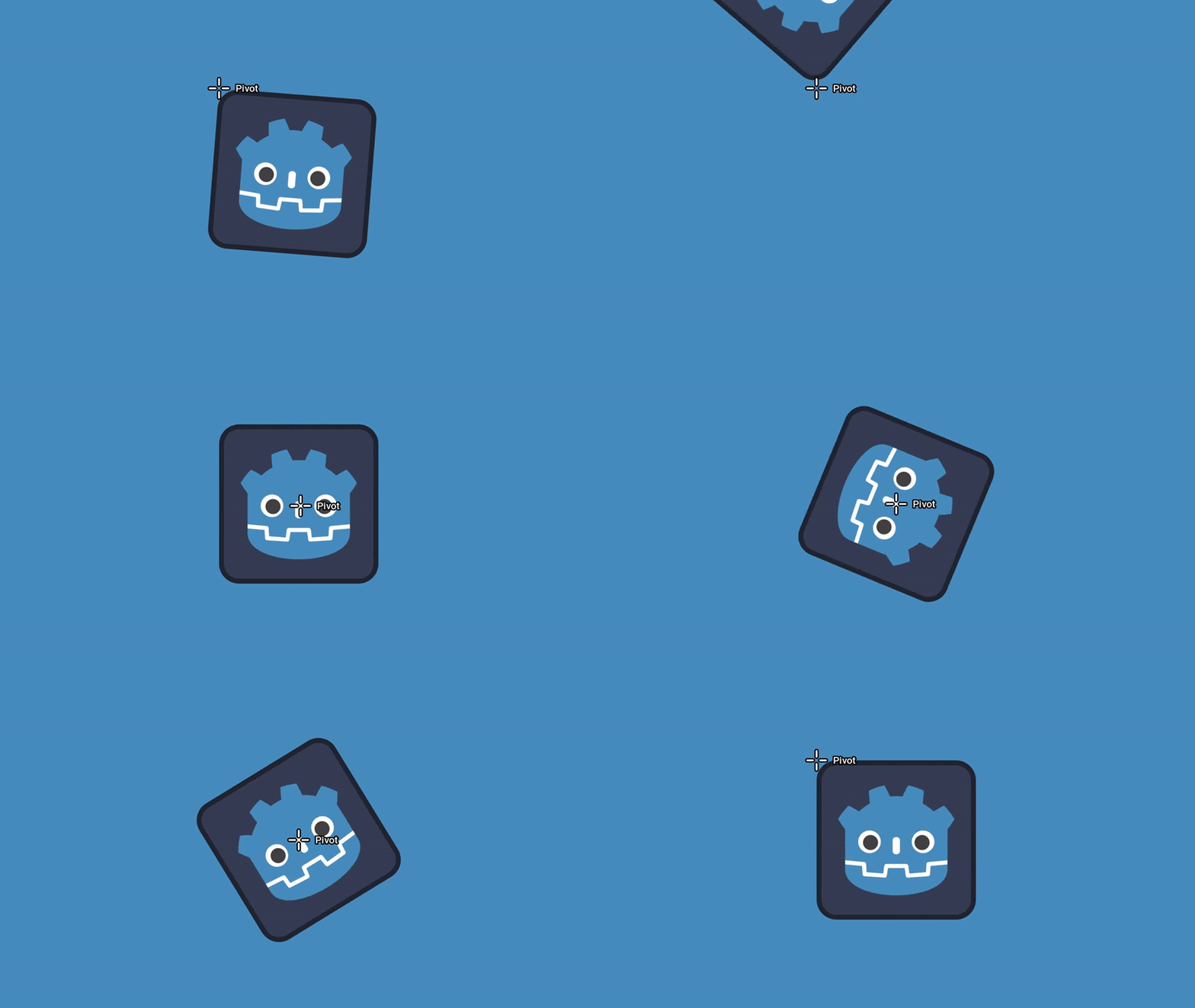
The new pivot_offset_ratio property solves this problem by defining the pivot relative to the size of the Control node instead of using fixed pixels.
Instead of saying “place pivot at 100 pixels from the left,” you now say “place pivot at 50% of the width.”
This value ranges from 0 to 1 and is mapped to the node’s size.
For example, (0, 0) represents the top-left corner, (0.5, 0.5) represents the center, and (1, 1) represents the bottom-right corner.
The most important advantage is that when the Control’s size changes, the pivot automatically stays at the same relative position.
This makes UI behavior predictable and removes the need for manual recalculations.
Why This Feature Is Important
This feature may look small, but its impact is significant for real projects.
It makes UI elements responsive by keeping pivot positions consistent even when sizes change. It improves animation workflows because scaling or rotating elements behaves reliably regardless of layout changes. It reduces manual calculations since developers no longer need scripts to maintain pivot alignment. It also improves consistency in container-based layouts where element sizes frequently update.
Developers in the discussion even mentioned that it greatly helps with dialog animations and similar UI interactions where pivot positioning previously required extra calculation.
In short, this change makes UI development more intuitive and modern.
How pivot_offset_ratio Works Internally
The feature works alongside the existing pivot_offset system. The traditional pixel offset still exists, but the new ratio property is now serialized in scenes, while the old property acts as a wrapper for absolute offsets.
The final pivot can be determined using both pixel offset and ratio offset together, giving developers flexibility when precise adjustments are required.
This design ensures backward compatibility with existing projects while enabling a more robust workflow going forward.
Also Read: How to Install Dokploy on Ubuntu VPS (Oracle Cloud Friendly)
How to Use pivot_offset_ratio in Godot
Using the feature is straightforward once you understand the coordinate system.
First, select a Control node in your scene. Then locate the pivot settings in the Inspector. Set the pivot_offset_ratio using values between 0 and 1.
If you want a center pivot for scaling animations, use (0.5, 0.5). If you want rotation from the right edge, use (1, 0.5). If you want expansion from the bottom corner, use (1, 1).
You can also modify it using code.
Example:
control.pivot_offset_ratio = Vector2(0.5, 0.5)
Now the pivot always stays centered regardless of how the element resizes.
Real Use Cases
This feature becomes especially useful in real-world UI design.
When creating animated dialog boxes, you can scale from the center without recalculating pivot values. When designing responsive UI layouts, pivot positions remain stable even when container sizes change. For UI transitions and effects, elements animate consistently across different screen sizes. For dynamic menus and panels, layout changes no longer break animation behavior.
Because UI size changes frequently in modern interfaces, a ratio-based pivot system dramatically simplifies development.
What Problems It Solves for Developers
This feature eliminates the need to recompute pivot positions after resizing, prevents unexpected animation shifts, improves responsive UI behavior, reduces custom workaround scripts, and makes UI transformations more predictable.
It essentially moves Godot’s UI system closer to modern design principles where layout and transformations adapt automatically.
Things to Keep in Mind
There are a few behavioral changes introduced with this feature. Changing a Control’s size now affects the absolute pivot offset because the ratio is preserved. You also cannot set a pivot when the Control size is zero.
These changes are intentional and reflect the shift toward relative positioning.
Why This Matters for the Future of Godot
The addition of pivot_offset_ratio reflects a broader direction in Godot development — improving usability, reducing friction, and making the engine more intuitive for real-world production.
Small improvements like this reduce hidden complexity and make UI systems easier to work with, especially for beginners and teams building scalable interfaces.
As Godot continues to evolve, changes like these show a strong focus on developer experience and modern design workflows.
Final Thoughts
The new pivot_offset_ratio property may look like a small technical addition, but it solves a deeply practical problem in UI development. By allowing pivot positions to scale with element size, it removes tedious manual work and ensures consistent behavior across layouts and animations.
If you build UI-heavy games, tools, or applications in Godot, this feature can significantly simplify your workflow and make your interfaces more reliable.
It is a simple idea — define pivots relatively instead of absolutely — but its impact on usability and animation control is substantial.